
Cancer
Clean a Mouse with White Paper for Smooth Cursor Movements

An illustrated guide about cleaning a slow and sluggish mouse in 2 seconds with just a piece of white paper.
If you are using an external laser or optical mouse with your laptop or desktop computer, you probably know the problems that surface after using the mouse for couple of weeks - the mouse feels sticky or is hard to move especially when you are using it without the mouse pad, the pointer on the screen may not move smoothly with the mouse or jump.
Most of these mouse problem are because of the dust that sticks to the bottom of the mouse surface at points that are in constant touch with the table or the mouse pad - see the red arrows in the above picture - the white circles are actually made from accumulated dust that is disrupting the smooth movements of the mouse.
To solve this problem, hold the mouse over a piece of white paper and gently (but firmly) drag the mouse from the top edge of the paper to the bottom as shown in the picture below.


You will see a trail of grease like substance on the paper - you can also repeat the process sideways - just move the mouse on paper from left to right. You will enjoy using mouse once again.
The trick is illustrated using Microsoft Wireless Laser Mouse 8000 with Intellipoint software but should work just perfect with any mouse including those for the Mac.
The Next Generation Microsoft Office 12
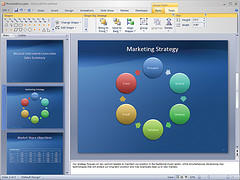 To bring new Office users under its belt, Microsoft are playing a big risk - they have completely redesigned the user interface of Microsoft Office Vista from scratch. That's not all - the new Office 12 system automatically pops up what it thinks are the most relevant commands based on whether the user appears to be typing a list, editing someone else's work or performing some other job.
Microsoft Word 2003 has more than 1,500 commands and 35 tool bars. Microsoft Word Vista won't have the legacy menu-bar. Instead, the menus have been replaced with 'Ribbons' or tab-like buttons. For instance, a click of the Write button will open and display buttons, bars and shortcuts pertinent to writing, such as font face, alignment, and line spacing.
And if you upgrade to Office 12, you'll have to say permanent goodbye to the old Office UI’s look and feel. Microsoft says that don’t have a “classic mode.” And Mac Users are complaining that Microsoft borrowed the Office 12 UI from Apple's Aqua interface.
Whether the new design UI becomes a trendsetter or force people to stay from the new Office, only time can tell. But it would definitely require a learning curve for even old Office fans. And where are there no screenshots of Office Outlook 12 interface. Does the Outlook interface not follow the same theme as other Office 12 programs ?
For Gates, Windows Vista and Office 12 are the fruition of five years' development work by Microsoft putting XML into the core of its architecture. Microsoft hopes the new features will entice users who have found it unwieldy to wade through the dozens of tool menus and other features packed into Office, the software suite that includes Word, PowerPoint, Outlook and Excel.
Microsoft Office 12 Official Information
Watch the Microsoft Office 12 Video at Channel 9 Video Length: 00:41:47, Size: 618Mb
Download Microsoft Office 12 presentations (PPT files from PDC 2005):
Introduction to the Programmable Customization Model for the "Office 12" User Experience (Part 1) OFF201_Harris.ppt
Developing with the Programmable Customization Model for the "Office 12" User Experience (Part 2) OFF302_Dhanjal.ppt
Groove: Building Enterprise Workgroup Applications OFF303_Pyle.ppt
Assembling, Repurposing and Manipulating Document Content Using the New Office File Format OFF304_Jones.ppt
InfoPath 12: Creating Browser-Based Forms for Enabling Data and Application Integration OFF306_Bath.ppt
Access 12: Developing Collaboration Solutions with "Access 12" and Windows SharePoint Services "v3" OFF307_Covington.ppt
Project Server 12: Developing Project Management Solutions OFF311_Smail.ppt
Outlook 12: Developing Solutions Using the Consolidated Outlook Object Model OFF312_Byrne.ppt
Word 12: Integrating Business Data into Documents using XML-based Data/View Separation and Programmability OFF316_Davis.ppt
Visio 12: Building Data Visualization Solutions OFF324_Morein.ppt
To bring new Office users under its belt, Microsoft are playing a big risk - they have completely redesigned the user interface of Microsoft Office Vista from scratch. That's not all - the new Office 12 system automatically pops up what it thinks are the most relevant commands based on whether the user appears to be typing a list, editing someone else's work or performing some other job.
Microsoft Word 2003 has more than 1,500 commands and 35 tool bars. Microsoft Word Vista won't have the legacy menu-bar. Instead, the menus have been replaced with 'Ribbons' or tab-like buttons. For instance, a click of the Write button will open and display buttons, bars and shortcuts pertinent to writing, such as font face, alignment, and line spacing.
And if you upgrade to Office 12, you'll have to say permanent goodbye to the old Office UI’s look and feel. Microsoft says that don’t have a “classic mode.” And Mac Users are complaining that Microsoft borrowed the Office 12 UI from Apple's Aqua interface.
Whether the new design UI becomes a trendsetter or force people to stay from the new Office, only time can tell. But it would definitely require a learning curve for even old Office fans. And where are there no screenshots of Office Outlook 12 interface. Does the Outlook interface not follow the same theme as other Office 12 programs ?
For Gates, Windows Vista and Office 12 are the fruition of five years' development work by Microsoft putting XML into the core of its architecture. Microsoft hopes the new features will entice users who have found it unwieldy to wade through the dozens of tool menus and other features packed into Office, the software suite that includes Word, PowerPoint, Outlook and Excel.
Microsoft Office 12 Official Information
Watch the Microsoft Office 12 Video at Channel 9 Video Length: 00:41:47, Size: 618Mb
Download Microsoft Office 12 presentations (PPT files from PDC 2005):
Introduction to the Programmable Customization Model for the "Office 12" User Experience (Part 1) OFF201_Harris.ppt
Developing with the Programmable Customization Model for the "Office 12" User Experience (Part 2) OFF302_Dhanjal.ppt
Groove: Building Enterprise Workgroup Applications OFF303_Pyle.ppt
Assembling, Repurposing and Manipulating Document Content Using the New Office File Format OFF304_Jones.ppt
InfoPath 12: Creating Browser-Based Forms for Enabling Data and Application Integration OFF306_Bath.ppt
Access 12: Developing Collaboration Solutions with "Access 12" and Windows SharePoint Services "v3" OFF307_Covington.ppt
Project Server 12: Developing Project Management Solutions OFF311_Smail.ppt
Outlook 12: Developing Solutions Using the Consolidated Outlook Object Model OFF312_Byrne.ppt
Word 12: Integrating Business Data into Documents using XML-based Data/View Separation and Programmability OFF316_Davis.ppt
Visio 12: Building Data Visualization Solutions OFF324_Morein.ppt
Microsoft Sparkle: Don't throw Flash away yet
Microsoft announced a new product called Expression Sparkle Interactive at PDC 2005 for creating Avalon user interfaces. Sparkle and the Windows Presentation Foundation together are seen as a Flash alternative and Adobe is already taking the Microsoft threat seriously. Sparkle draws much of its inspiration from Macromedia Flash like Timelines, Drawing Tools and Image support. And 3D drawing and animation is one area where Microsoft sparkle has an upper-hand over Macromedia Flash. Sparkle also gives developers the full breadth of programming languages such as C# to add interactivity to their solutions. But Sparkle is designed only to work with Windows Longhorn (read, Vista) which won't be available until late 2006. And it would take much greater time before people actually start buying Windows Vista. That gives Adobe-Macromedia enough time to improve Flash. The ubiquitous lightweight Flash player is available for Windows, Mac, Linux, handheld devices and cellular phones. And Flash Player is free while Sparkle would require users to upgrade to a completely new OS and even new hardware. Sparkle is a very promising technology but it will take years before we start seeing actual Sparkle applications. Till then, it's Flash all the way. If Adobe incroporates 3D features from Adobe After Effects into Macromedia Flash 9, Sparkle will find the going even tougher.
Google gives a fitting reply to Mark Cuban
 Mark's warning to Google may have worked initially but Google had much bigger plans - Google Labs were secretly working on a another project Google Blog Search that could spell the untimely demise of Icerocket and other blog search engines. (Score - Mark 1, Google Wins)
Google BlogSearch is still in beta but looks promising already. If your blog pings Weblogs.com or other services, you are automatically included in Google index. You can search for posts by individual authors, subscribe to result feeds and sort the results either by relevance or by date (excellent).
Google has introduced four new search operators specific to blog search - inblogtitle, inposttitle, inpostauthor and blogurl.
There are however a few things that could have been better in Google Blog search:
1. Only blog posts from May 2005 are in the Google index.
2. Technorati is faster in crawling new information
3. Technorati style Cosmos (citations) would be useful
4. If you don't publish site feeds, Google won't find you
5. The Related pages feature needs some fine tuning.
6. Google could include the Top 3 results of regular web search in the results.
Time for Google is do all the talking.
Update: Mark did respond to the threat from Google Blogsearch arguing that Google is good but Icerocket is better
Mark's warning to Google may have worked initially but Google had much bigger plans - Google Labs were secretly working on a another project Google Blog Search that could spell the untimely demise of Icerocket and other blog search engines. (Score - Mark 1, Google Wins)
Google BlogSearch is still in beta but looks promising already. If your blog pings Weblogs.com or other services, you are automatically included in Google index. You can search for posts by individual authors, subscribe to result feeds and sort the results either by relevance or by date (excellent).
Google has introduced four new search operators specific to blog search - inblogtitle, inposttitle, inpostauthor and blogurl.
There are however a few things that could have been better in Google Blog search:
1. Only blog posts from May 2005 are in the Google index.
2. Technorati is faster in crawling new information
3. Technorati style Cosmos (citations) would be useful
4. If you don't publish site feeds, Google won't find you
5. The Related pages feature needs some fine tuning.
6. Google could include the Top 3 results of regular web search in the results.
Time for Google is do all the talking.
Update: Mark did respond to the threat from Google Blogsearch arguing that Google is good but Icerocket is betterGoogle is fast. But it becomes very slow when you have to go to jump between their front page advanced search page in order to date delimit your search. Google doesnt support Topics/Tags. Which means that when you do a search for a keyword and it returns 3k results today, well that same search might return 33k results next year at this time. Google has some nice search delimiters, but self inclusion in a topic by the author is probably the best. And when it comes to subscribing to RSS readers from google competitors like My Yahoo , Newsgator and MSN, icerocket makes it easy. Just click on the icon. Google makes it an ordeal.For reasons known only to Mark, the post has been deleted from Mark's blog. You can still view Mark's reponse in Google's cache.
ISYS Desktop Search Software Review
ISYS Desktop Search Software Review
 A Newspaper publisher has several years' worth of newspaper articles in more than 42,000 PDF files. And the company is relying on ISYS software for retrieving information from this vast repository of data (18 GB). The data retrieval is much faster than if they were searching and loading native PDF files.
ISYS:Desktop is a comprehensive enterprise-ready desktop search application to search the contents of individual PCs, LANs and WANs. ISYS desktop search software is light-years ahead of competition with several ground-breaking features like Natural Language, Time limited searches, On-the-fly categorization and results clustering, excellent linguistic support, Result Filtering and a Knowledge Warehouse. The software is lightning fast, accurate, intelligent, easy-to-use and enterprise-ready. Highly recommended.
A Newspaper publisher has several years' worth of newspaper articles in more than 42,000 PDF files. And the company is relying on ISYS software for retrieving information from this vast repository of data (18 GB). The data retrieval is much faster than if they were searching and loading native PDF files.
ISYS:Desktop is a comprehensive enterprise-ready desktop search application to search the contents of individual PCs, LANs and WANs. ISYS desktop search software is light-years ahead of competition with several ground-breaking features like Natural Language, Time limited searches, On-the-fly categorization and results clustering, excellent linguistic support, Result Filtering and a Knowledge Warehouse. The software is lightning fast, accurate, intelligent, easy-to-use and enterprise-ready. Highly recommended.
 While most of the popular tools from MSN, Yahoo! and Google are struggling to find a place on the Enterprise desktops, ISYS already has thousands of clients including Law Enforcement agencies, Attorneys, Federal Government agencies and Financial institutions including Goldman Sachs and Australian Stock Exchange.
ISYS:desktop 7 supports more than 30 foreign languages and 140 file formats, including Microsoft Office documents, Internet Cache (IE, Firefox, Netscape), PDF, Outlook PST, Flash (SWF), CHM, ASCII, ZIP, email, attachments, HTML, XML, IFilters, databases (RDBMS via ODBC) and more. You can view file contents even if you don’t have the original application in which the file was created. Documents are indexed at a speed of ~ 40 Mb/min.
While most of the popular tools from MSN, Yahoo! and Google are struggling to find a place on the Enterprise desktops, ISYS already has thousands of clients including Law Enforcement agencies, Attorneys, Federal Government agencies and Financial institutions including Goldman Sachs and Australian Stock Exchange.
ISYS:desktop 7 supports more than 30 foreign languages and 140 file formats, including Microsoft Office documents, Internet Cache (IE, Firefox, Netscape), PDF, Outlook PST, Flash (SWF), CHM, ASCII, ZIP, email, attachments, HTML, XML, IFilters, databases (RDBMS via ODBC) and more. You can view file contents even if you don’t have the original application in which the file was created. Documents are indexed at a speed of ~ 40 Mb/min.
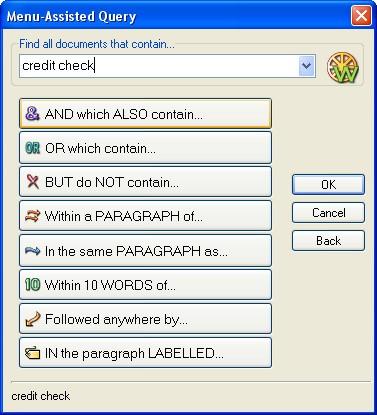 ISYS:Desktop provides a variety of search methods to quickly retrieve relevant information. The Menu-Assisted Query is like a visual guide for creating complex searches. Command Based and Web-Style Query enables you to construct Boolean searches, date specific, phrase searching and position specific searches. With Natural Language Query, users can phrase their searches in the form of a question. (remember AskJeeves).
Search results are displayed in the ISYS:desktop window with a preview pane, and hit-to-hit navigation allows users to jump from one instance of a search term to another, eliminating the need for scrolling. You can attach Hyperlinks, Text notes or Graphical annotations to your indexed documents without modifying the original documents. ISYS:desktop automatically creates categories when indexing, based on metadata, folder names, database table names, and related attributes.
ISYS:Desktop provides a variety of search methods to quickly retrieve relevant information. The Menu-Assisted Query is like a visual guide for creating complex searches. Command Based and Web-Style Query enables you to construct Boolean searches, date specific, phrase searching and position specific searches. With Natural Language Query, users can phrase their searches in the form of a question. (remember AskJeeves).
Search results are displayed in the ISYS:desktop window with a preview pane, and hit-to-hit navigation allows users to jump from one instance of a search term to another, eliminating the need for scrolling. You can attach Hyperlinks, Text notes or Graphical annotations to your indexed documents without modifying the original documents. ISYS:desktop automatically creates categories when indexing, based on metadata, folder names, database table names, and related attributes.
 Common words (or stop words) like AND, THE, AT, IT which have little meaning are automatically excluded from the index. The Word Wheel feature ("sounds like" or "starts with") suggest spellings or existence of a word in your index. While searching HTML documents, you can view the source code or the rendered document side by side. ISYS allows you to define a Synonym ring containing words with a similar meaning. Say if you create a "Footwear" ring, a search for shoes or sandals will find all synonyms of Footwear. And the Intelligent Agent automatically tracks that meet a certain custom-defined criteria. (reminds me of Blinkx Smart Folder technology)
ISYS Product screenshots. Download a 14 day trial. When you install ISYS, you must supply a valid full license code which must also be activated.
ISYS Search software is also included in the "The 2005 Software 500" list released by the Software Magazine. The ranking is based on total worldwide software and service revenue for 2004. This includes revenues from software licenses, maintenance and support, training and software-related services and consulting.
Dave Haucke of ISYS Search Software provided us a full copy of ISYS:Desktop 7 with ISYS:spider module for this review.
Common words (or stop words) like AND, THE, AT, IT which have little meaning are automatically excluded from the index. The Word Wheel feature ("sounds like" or "starts with") suggest spellings or existence of a word in your index. While searching HTML documents, you can view the source code or the rendered document side by side. ISYS allows you to define a Synonym ring containing words with a similar meaning. Say if you create a "Footwear" ring, a search for shoes or sandals will find all synonyms of Footwear. And the Intelligent Agent automatically tracks that meet a certain custom-defined criteria. (reminds me of Blinkx Smart Folder technology)
ISYS Product screenshots. Download a 14 day trial. When you install ISYS, you must supply a valid full license code which must also be activated.
ISYS Search software is also included in the "The 2005 Software 500" list released by the Software Magazine. The ranking is based on total worldwide software and service revenue for 2004. This includes revenues from software licenses, maintenance and support, training and software-related services and consulting.
Dave Haucke of ISYS Search Software provided us a full copy of ISYS:Desktop 7 with ISYS:spider module for this review.
Google Adsense Adwords Keyword Arbitrage
If you type "e-mail marketing" into Google's search engine, Bronto Software appears under "sponsored links." Click on that link and the Durham, N.C., software company pays Google $6.50. Bronto spends up to $1,200 daily on Google ads but Bronto executives say it's a worthwhile investment. Bronto knows that 5% of Google searchers who click on a Bronto link seek more information about the company. And 5% of those folks become customers. Bronto has bids in on 800 key words and phrases - from a high of $6.50 per click to as low as $1.75 for "law firm marketing products."Many ads, like Google's search ads, don't cost a dime until someone clicks them. And the Web enables companies to track how much time someone spends with an ad and how many viewers make a purchase. Also attractive to advertisers is that they can set their own price. Multiple companies can choose to run ads tied to the same key words. The more they pay, the higher they appear among the sponsored links.
